Game dev workflows have a lot of moving pieces, and launching builds correctly is one of them. Every team handles it differently, but the underlying need is the same: a fast, consistent way to run a build with the right configuration for the job. Custom Launch Buttons in Solsta give game dev teams exactly that.
Custom launch buttons are the mechanism inside Solsta that removes launch configuration from the hands of individual team members and makes correct behavior the default. They eliminate the daily friction of remembering which executable to launch, which flags to pass, and which config matches their role across QA, dev, devkit, and cert workflows.
Who this is for
Custom Launch Buttons are useful for any role that touches a build. Build engineers managing the pipeline, QA leads running daily test passes, tools programmers debugging integrations, and producers spot-checking milestone candidates all benefit from having the right launch configuration one click away. Whether your team ships in Unreal, Unity, or a proprietary engine, the underlying problem is the same: every build can be launched a dozen different ways, and the wrong configuration wastes time. Solsta is a SOC 2 Type II and ISO 27001 certified game build distribution platform.
What game teams already do (and where this fits)
Every studio handles build launching differently. Some use batch files checked into Perforce. Others rely on internal launcher tools maintained by a build engineer. Some have Python wrappers around their build automation. Many have a Confluence page titled "How to Launch the Build" that hasn't been updated since the last milestone. Some teams have invested years in custom build pipelines and aren't replacing them.
Custom Launch Buttons aren't a replacement for any of that. They are the standardization layer on top of build distribution. They handle the step between the build being on disk and the build running with the right flags. If your team has its own build server, version control workflow, and CI pipeline, those stay. Launch buttons handle the last mile of which executable runs, with which arguments, in which environment.
What a custom launch button actually does
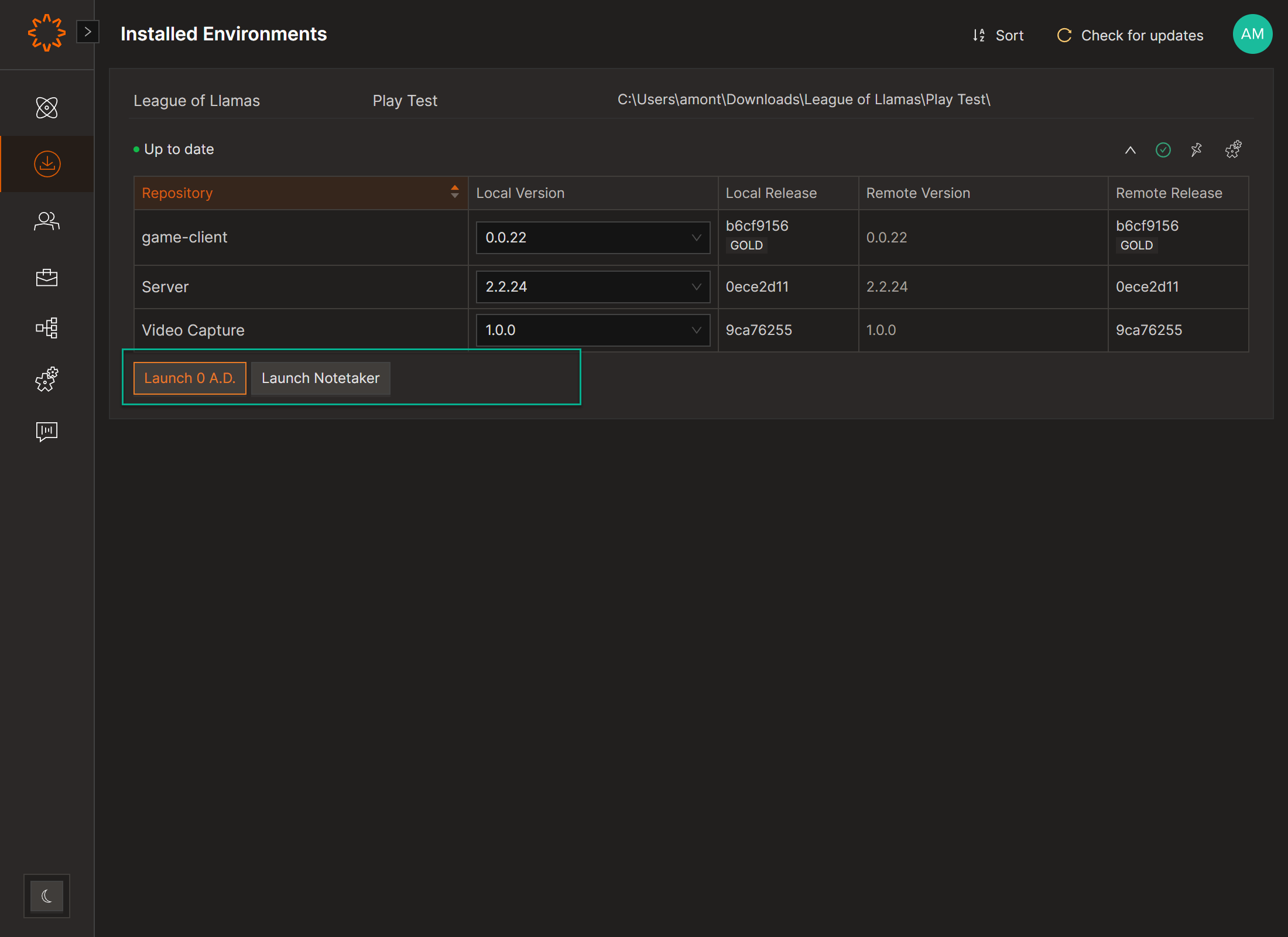
A launch button maps an executable path to a fixed argument set, attached to a build environment in Solsta. When the environment syncs to a machine, the buttons are available to anyone who installs it. There is no manual setup, no copying scripts, and no asking a teammate which flags to use.
A few common patterns:
Launch Game - Dev
Dev environment, telemetry off, local asset paths, verbose logging. The build engineer running smoke tests doesn't reconstruct the command each time.
Launch Game - QA
Verbose logging on, test harness flags enabled, QA backend connection. QA clicks once and tests the build. The flags are correct because the build engineer set them when the button was published.
Launch Devkit
Console devkit configurations are their own category of complexity. They use different executables, cert flags, and sometimes different title IDs depending on submission stage. A button per devkit configuration removes the manual command construction at the worst possible moment.
Launch Client + Game
Workflows that need a client process or tool running alongside the main executable can be wired into a single button by pointing it at a wrapper script that handles the sequence.
Global vs. Local: Which Type Should Your Team Use?
In Solsta, Global Custom launch buttons enforce team-wide consistency while User Local buttons accommodate individual workflows. Both coexist in the same environment without conflict.
Launch buttons in Solsta eliminate per-engineer launch configuration drift by attaching the correct executable path and argument set directly to the build environment, so the button is always current, always consistent, and ▎ requires no manual setup from the team member running it.
Global Custom buttons are created at the Environment level by an admin and visible to everyone on the team who installs the environment. These enforce the team's standard configurations, including the canonical QA build launcher, the milestone candidate launcher, and the cert devkit. Only admins can create them. This is how you make the correct configuration the default configuration.
User Local buttons are personal launch buttons visible only to the creator. They are designed for faster shortcuts and individual workflows.
Why launch configuration belongs in the distribution platform
The argument for putting launch buttons in a build distribution environment, rather than a script folder or a wiki page, comes down to three properties. They live with the environment. Access is scoped through the same permission model. Team members get them automatically when they install the environment.
A batch file on a shared drive is only as current as the last person who remembered to update it. It is only consistent for the people who know it exists. A Global Custom button is part of the environment itself, so anyone who installs the environment gets it.
For teams already using Solsta for build distribution, launch button configuration is part of the environment, not a separate system. Full reference at solsta.io/resource-doc/launch-buttons.
How Do You Create a Custom Launch Button in Solsta?
Global Custom (admin):
1. Open Product and select the Environment
2. Select the Launch Buttons tab
3. Click Create Launch Button
4. Enter the Executable (required) and Arguments (optional)
5. Click Create
User Local (any team member):
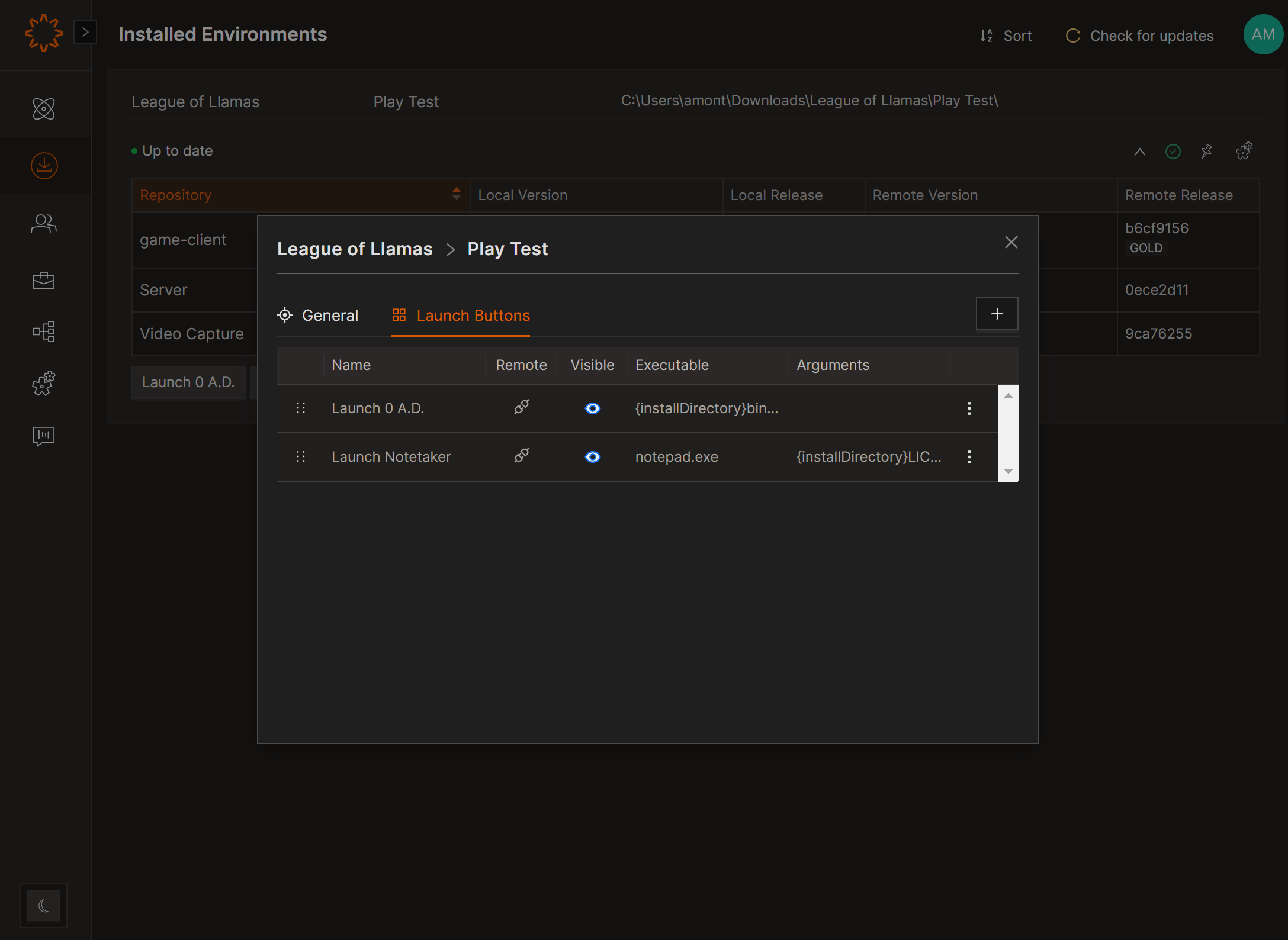
1. Navigate to the Installed Environments tab
2. Select the Settings icon
3. Choose the Launch Buttons tab
4. Create, copy, view, edit, reorder, or delete buttons from the panel
Why Should Launch Buttons Live in the Build Environment, Not a Script Folder?
The argument for putting launch buttons in a build distribution environment rather than a script folder or wiki page comes down to three properties: they live with the environment, access is scoped through the same permission model, and team members get them automatically when they install the environment.
A batch file on a shared drive is only as current as the last person who remembered to update it. It is only consistent for the people who know it exists. A Global Custom button is part of the environment itself, so anyone who installsthe environment gets it.
This is a small but meaningful piece of game build automation, not a pipeline script, but a consistency mechanism that removes a class of manual error from every role on the team.
Custom launch buttons in Solsta eliminate per-engineer launch configuration drift by attaching the correct executable path and argument set directly to the build environment, so the button is always current, alwaysconsistent, and requires no manual setup from the team member running it.
For teams already using Solsta for build distribution, launch button configuration is part of the environment, not a separate system to manage.
Full documentation:
To learn more about launch buttons visit our Resource Center: solsta.io/resource-doc/launch-buttons
FAQ
What is a custom launch button in game development?
A custom launch button is a configured shortcut that points to a specific executable and runs it with predefined arguments. In Solsta, launch buttons are created at the environment level so every team member who installs the environment gets the correct launch configuration automatically, without manual setup.
What is the difference between a Global and a Local launch button in Solsta?
Global Custom buttons are created by an admin at the environment level and visible to everyone on the team who installs the environment. User Localbuttons are personal, created by individuals and visible only to them. Both types coexist in the same environment without conflict.
Can I configure different launch arguments for dev and QA environments?
Yes. Each environment carries its own set of launch buttons. A Dev environment button can pass dev flags and disable auth. A QA environment button can enable verbose logging and a test harness. This is the correct way to handle launch configuration management across environments without maintaining separate scripts per role.
Do custom launch buttons stay attached when a build is updated?
Launch buttons are tied to the environment, not to a specific build version. When a new build is synced, the existing buttons continue to work as configured. If a path or executable name changes with a new build, an admin can update the button configuration at the environment level.
Who can create Global launch buttons?
Only admins can create Global Custom buttons. Any team member can create their own User Local buttons at any time without admin privileges.
Why is one of my launch buttons grayed out?
A disabled button means the file it is mapped to isn't installed locally on your machine. Once the environment finishes installing, the button becomes active.
How do I configure a launch button to run a devkit build or external tool in Solsta?
Point a button at the client executable or devkit launcher with the appropriate arguments. For sequenced processes, such as starting a client before the game, a common pattern is to point the button at a wrapper script that handles the sequence. The button accepts whatever arguments the target executable supports.