When you are outsourcing game development, invite each partner's people to your organization with the right role, group them into a team, then give that team access only to the products or environments it works on. Review the snapshot history while the work runs, and remove the team's access when the engagement ends.
Collaboration happens at so many phases of a project, often long before it reaches production. With the game industry changing as fast as it is, outsourcing and collaborating on large IP titles can be risky and rewarding at the same time. Some of the largest titles of 2026 show how much studios now rely on outside teams: Halo: Campaign Evolved reportedly drew on as many as 15 external studios, and Gears of War: E-Day was co-developed by The Coalition and People Can Fly. Across the industry, outsourcing in game development reached a record 35.5% of content investment in 2025, according to Matthew Ball's The State of Video Gaming in 2026.
The more people involved in a project, the more there is to protect. Distributed development teams often span multiple studios and locations, with designers, artists, producers and testers all working on different parts of the game, which makes security around your IP and your builds matter even more. The biggest risks are an unreleased build that leaks, a title a partner was never meant to see, or a contractor account that keeps working long after the contract ends.
This guide covers best practices for collaborating securely with partners, outsourced teams and external development studios, so your project stays secure at scale.
Game development collaboration: one workspace for every collaborator
Everyone working on a project needs one central place to access what they need and stay on track. Partners need to install and test builds, teams need to organize releases, and everyone needs to find the right version when something breaks. When all of that happens in one place, the project lifecycle is more efficient and much easier to manage.
Getting this right matters throughout a project, and especially when the pressure is on. As deadlines get closer and crunch sets in, teams are watching every milestone and making the most of every hour to fit in more iterations. Studios shipping daily builds to partners all over the world need a workspace they can rely on.
Best practices for secure collaboration with outsourced teams and partners
Whether you are using your own in-house system or Solsta, here are the best practices we recommend when working with outsourced teams and partners, so you feel secure and know your project is in good hands.
1. Put guardrails on every invite
When you invite a collaborator into your workspace, decide what access they have before they arrive. If you own the project and are setting it up, you want a few different roles: enough to give partner teams ownership of their part of the work, while you stay in control of who can reach the project.
Solsta gives you three roles to control access across your project:
Admin: invites and manages users, and creates and manages products and environments.
Viewer: view-only access. On a product or environment, a Viewer can install and update builds without being able to change anything.
Member: joins teams and gets whatever access each team has been granted.
You can also delegate access. The Inviter role lets someone else, such as a partner's producer, bring in their own people without holding full admin rights, so the person managing the day-to-day work can manage their own roster. See Inviting Members and Organization Access Controls.
2. Scale access with teams
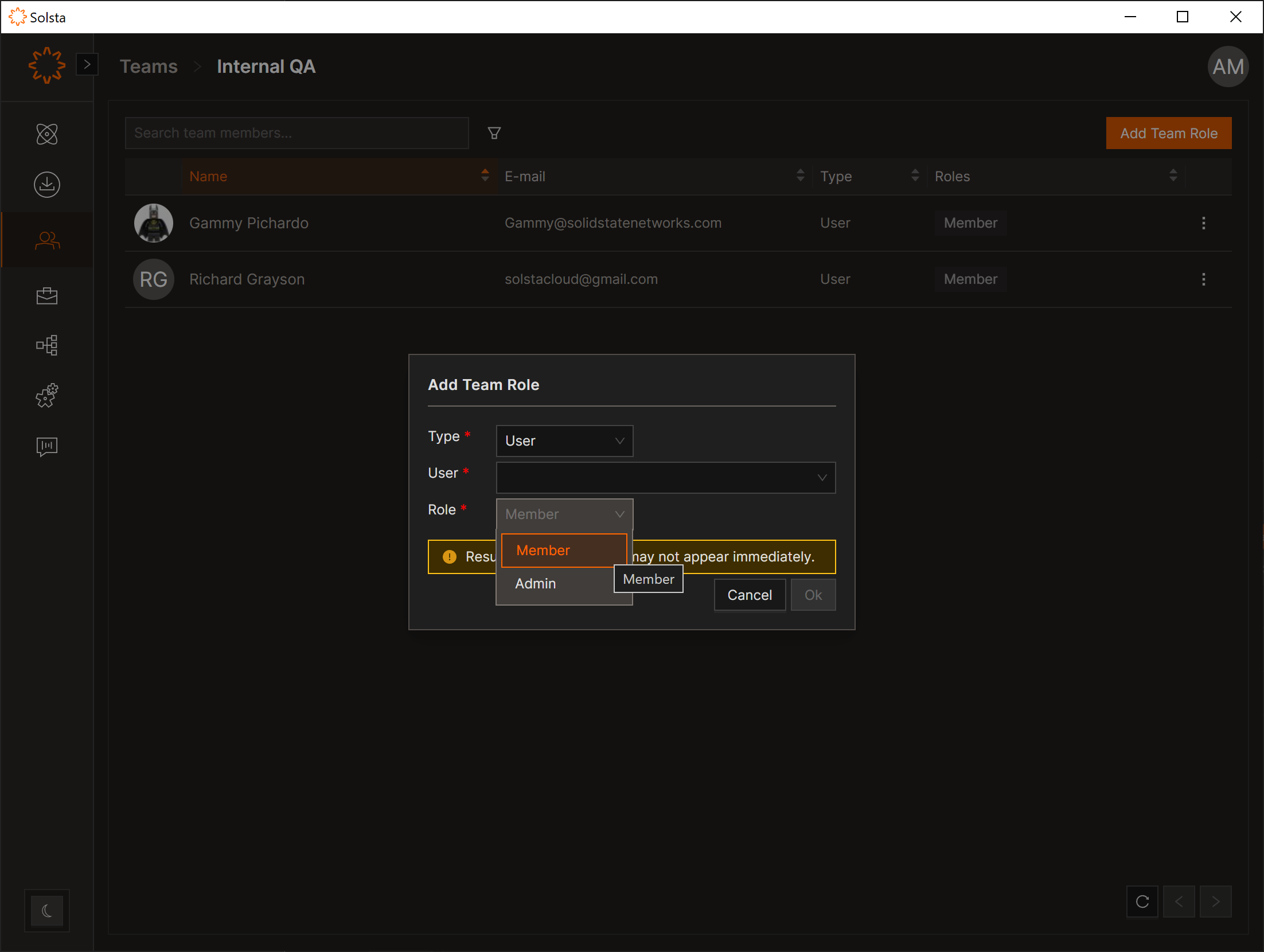
Whether you are working with other studios or with several teams across the same title, grouping users into teams is far easier to manage than tracking individual contributors across a portfolio of projects. Set up a team such as "Co-Developers", "3rd Party QA" or one per partner studio, grant it access once, add people as the partner grows, and revoke the team's access in one pass when the work ends.
Each team member gets a team role of Admin or Member. A Team Admin can add or remove members of that team, so a partner lead can manage their own roster without coming to you. See Creating Teams and Team Roles & Permissions.
3. Keep studios separate with organizations
Studio groups and partner studios working across one title or several rarely fit into one big roster, and they do not have to. In Solsta, products and environments can be granted to a whole organization, a team or an individual user. Each studio keeps its own organization and its own people, and you decide exactly which titles and environments they share. See Product Members and Environment Members.
4. Assign machines to your project's environments
A machine is any device that needs builds without a person signed in to it: a PC, a Mac, a server, a Linux box or a console dev kit. In Solsta, machines appear right next to users and teams when you assign roles, so you can add one straight to a project's environment or to a partner's team.
Machines authenticate with machine-to-machine (M2M) credentials instead of a person's login. That keeps shared hardware off personal accounts. Nobody has to leave their own credentials on a test rig or dev kit, and offboarding a partner's people does not break the machines your pipeline depends on. It also keeps the setup simple: assign a devkit to the environment it tests, and builds deploy straight to the console. See M2M Credentials doc to learn more.
5. Control project access
Give teams, organizations, users and machines access only to the parts of your project they need. Access is set per product, which covers everything inside it, or per environment, which is how you shield the rest. A partner working on a dev build sees that environment and nothing else in the product.
Both levels offer two roles. A Viewer can view the product or environment and install or update its builds. An Admin can also manage member access, configure launch buttons, and promote and publish snapshots. That means you can make the partner's lead an Admin on their own environment and let them handle their people. Partners reach those builds through the platform, not your studio network. No VPN tunnel to open, and no shared drive to clean up later. See Product Members and Environment Members.
Admin permissions override Viewer permissions where both apply, so check the team's roles before adding an individual role on top.
6. Keep an audit trail
While the work is running, the environment's snapshot history is the record of the collaboration: which build versions landed in which environment, and when. It is the first place to look when a partner reports a problem, and the clearest summary of what they had access to when the engagement closes. See History.
To see who can reach a build right now, open the environment's member list. It shows each user and team with access and the role they hold.
7. Onboard and offboard with secure control
Removing people from a project should be just as easy as adding them. Contracts close, people move on to other projects, and a partner account nobody remembers can keep working for months after the work is done.
Good offboarding comes down to visibility. With a clear view of who has access to what, at any time and in one place, the people running the project can bring partners in as they need them and remove them the moment the work ends. In Solsta, each environment's member list shows every user, team and machine with access, so offboarding a partner means removing their team, not tracking down every account.
8. Use a collaboration checklist
Before a partner starts, and again when they finish, have these in place: Onboard and offboard partners, teams and the studios you work with An audit trail of deployments and shared collaboration
Fine-grained access for orgs, teams, products and environments SSO onboarding, so users in your identity provider's groups are enrolled automatically If your partners include external game QA or playtest teams, Playtesting vs QA Teams covers how their build needs differ.
Where Solsta fits
We built Solsta for this exact handoff. It is a build distribution and orchestration platform for game studios. It plugs into the CI/CD you already run, whether that is Jenkins, TeamCity, GitHub Actions or GitLab, and delivers builds to internal teams, QA, co-dev partners, publishers and console dev kits. Delta transfer moves only what changed, and role-based access with SOC 2 and ISO 27001 security keeps control with you.
"We love Solsta. It enables us to distribute our internal builds across our worldwide development partners with simplicity and confidence." Principal Architect, AAA studio
The best practices above are how that access works in practice. Give partners what they need, nothing more. Professional build delivery, scoped partner access and enterprise-grade security are on every plan, free to start.